
What Is the Kayastha Directory and Why It Matters
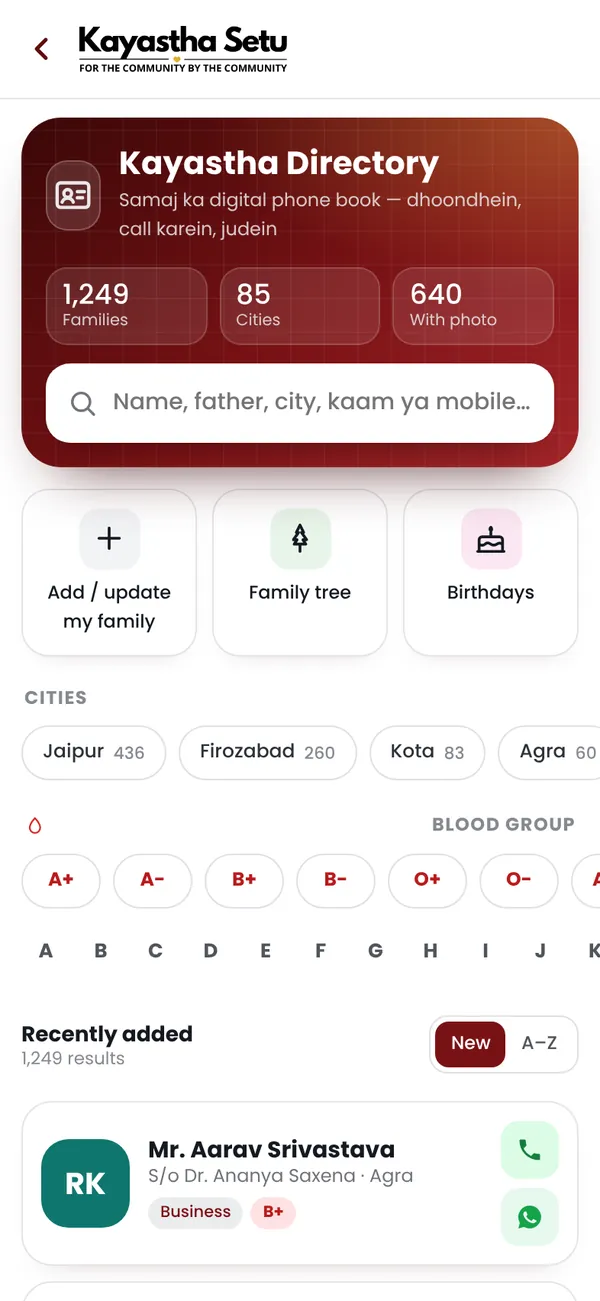
The Family Directory on Kayastha Setu (kayasthasetu.com) is a searchable list of verified Kayastha families across India, organised by name, city, occupation and sub-community. It works like a modern samaj address book — you type a surname, city or profession, and instantly see real family profiles with photos, contact details and background information. Every member who joins is verified with a one-time password (OTP) on their real mobile number, so when you find someone, you know they are genuine.
For Kayastha families spread across India — and increasingly abroad — the Kayastha directory solves a real problem. Aunts and uncles who knew everyone's family tree have grown older. Cousins move cities and lose touch. Young people looking for rishtas (marriage prospects) want to verify a family's background. Parents relocating to a new city want to connect with the local samaj. The directory brings that community knowledge into one searchable app.
Real-Life Situations Where the Kayastha Directory Helps
Here are some everyday moments when families actually use the directory:
- Reconnecting with cousins: You remember a Srivastava cousin who moved to Bangalore twenty years ago. Type "Srivastava Bangalore" and find their profile — photo, mobile, WhatsApp. One tap and you're back in touch.
- Checking a rishta: Your parents like a boy for your sister. Before the proposal moves forward, they want to know about his family — where his father works, what city they're from, whether there are known relatives. The directory shows all of this on one clean card.
- New to a city: You've just moved for work and want to meet Kayastha families nearby. Search by city and occupation ("Engineer, Delhi") and find people who share your background and can help you settle in.
- Finding a professional: You need a good Kayastha vakil (lawyer), doctor or accountant. Search by occupation and city to find trusted professionals who come recommended by the community.
- Family history projects: You're compiling a family tree and need to contact distant relatives you've lost touch with. The directory becomes your research tool — you can locate branches of your family and gather stories and photos.
How the Kayastha Directory Works: Step-by-Step
Using the directory is straightforward. Here's what to do:
- Open the Directory: From the app home screen, tap the Directory icon or search button.
- Type what you're looking for: Enter a name (e.g., "Sharma"), a city (e.g., "Mumbai"), a profession (e.g., "Doctor") or a sub-community (e.g., "Mathur"). Results appear as you type — no need to hit "Search".
- Browse the results: You'll see a list of matching family profiles, each with a photo, father's name, city, occupation and blood group. Premium members show a blue Verified badge for instant trust.
- Open a full profile: Tap any card to see the complete family details — all contact options, related family members and how to reach them.
- Connect: Use the one-tap call or WhatsApp buttons to get in touch, or save the contact to your phone for later.
The whole process takes seconds. Unlike old phone books or scattered WhatsApp groups, the directory is always current because members update their own profiles and our team reviews changes before they go live.
What Information Can You Find?
Each family profile in the Kayastha directory includes:
| Information | Details |
|---|---|
| Name & Photo | Full name and a current profile picture |
| Father's Name | Helps you connect to the right family branch |
| City & Address | Where the family is based |
| Occupation | Profession or line of work |
| Sub-Community | Srivastava, Mathur, Bhatnagar, etc. |
| Blood Group | Medical emergency info at a glance |
| Contact | Mobile, WhatsApp, email options |
If a family has set up their Family Tree on the app, you can also jump from their profile to see how you're related — useful for understanding family connections quickly.
Smart Search Features & Tips to Get the Most Out of It
The Kayastha directory search is designed to be flexible and fast. Here's how to search like a pro:
Search by Name
Type a surname ("Srivastava"), a first name or a full name. The directory shows all matching profiles. This is the quickest way to find someone you know by name.
Search by City
Type a city name like "Jaipur", "Kolkata" or "Pune" and see all Kayastha families registered there. Useful when you move to a new city or want to find cousins in a specific place.
Search by Occupation
Search for "Engineer", "Teacher", "Shopkeeper" or "Accountant" to find professionals in your community. Pair it with a city for even better results — e.g., "Doctor Mumbai".
Search by Sub-Community
Type your sub-community name (Srivastava, Bhatnagar, Mathur, Saxena, Saxena and others) to see all families from that branch. This is especially helpful for rishta hunting or connecting with your specific samaj sub-group.
Tip: If you don't find someone on your first try, try spelling variations. For example, "Srivastav" vs. "Srivastava" or "Saxena" vs. "Saxna". Results appear as you type, so you can refine your search in real time.
Privacy & Safety: Who Can See Your Profile?
A question many families ask: Will my details be shared outside the community or sold to outsiders? The answer is no. Here's how your privacy is protected:
- Only logged-in members see your profile. You must verify your mobile with an OTP to join Kayastha Setu. Only other verified members can search and view your profile. No profile is visible to strangers or outside websites.
- Your details stay within the community. Kayastha Setu never sells, shares or rents member data to businesses, marketers or third parties outside the samaj.
- You control what you share. You choose what information goes on your profile — you can always edit, hide or delete details. Even your contact options (call, WhatsApp, email) can be toggled on or off.
- Profiles are reviewed for accuracy. When you update your profile, a moderator checks the changes to prevent spam or false information.
This is one reason why every profile carries an OTP-verified badge. It means real people, real safety and real community trust.
Free vs. Premium: What's Included?
Joining Kayastha Setu is free. You get access to much of the app — community stories, birthday wishes, emergency help and more. However, the full Family Directory — with unlimited search and all member contact options — is a Premium feature.
Premium membership is ₹149 per month (including GST) and includes the Family Directory plus many other perks like priority samaj events, exclusive job postings and community marketplace access. You can buy Premium at kayasthasetu.com/pay.
For most families, Premium quickly pays for itself. One reconnection with a lost cousin, one trusted professional referral, or one rishta verified saves time, worry and mistakes that could cost far more.
Getting Started with the Kayastha Directory
Ready to find your samaj family? Here's how to begin:
- Download the app from your phone's app store or visit kayasthasetu.com/download to get started.
- Sign up free with your mobile number — you'll receive an OTP to verify.
- Set up your profile with a photo, your family details and occupation so others can find you too.
- Browse the free features to explore the community.
- Get Premium when you're ready to unlock the full Family Directory and connect with Kayastha families across India.
For more on how to build trust and verify profiles in the community, read our guide to Verifying Kayastha Setu Profiles. And if you're looking to reconnect with lost relatives, our article on Finding Relatives with the Family Directory has more strategies and real stories.
The Kayastha directory is built on the idea that our samaj is stronger when we know each other — across cities, generations and time. Whether you're searching for a cousin, checking a rishta or building your family tree, the directory brings the community closer, one profile at a time.
Find any Kayastha family by name, city or profession — your community address book.
ExploreFrequently asked questions
Is the Kayastha family directory free?
Joining Kayastha Setu and basic features are free. However, the full Family Directory — with every family, unlimited search and one-tap call and WhatsApp options — is part of Premium membership at ₹149 per month (including GST). You can upgrade anytime at kayasthasetu.com/pay.
Who can see my profile in the directory?
Only logged-in, OTP-verified members of Kayastha Setu can see your profile. Your details are never sold, shared or visible to people outside the app or the community. You stay in control — you can edit, hide or delete any information anytime.
Can I search by sub-community like Srivastava, Mathur or Bhatnagar?
Yes. Type the sub-community name (e.g., 'Srivastava', 'Mathur', 'Bhatnagar') in the search box and the directory shows all matching families from that branch. This is especially useful for rishta hunting or connecting with your specific samaj sub-group.
How do I know if a profile is real and verified?
Every member who joins Kayastha Setu verifies their mobile number with an OTP, so you know they are real. Premium members show a blue Verified badge on their profile. Additionally, all profile updates are reviewed by our team before they go live to keep the directory accurate.
About Kayastha Setu: Kayastha Setu (kayasthasetu.com) is the community app of the Kayastha samaj — family directory, Kayastha matrimony, jobs, blood donors, SOS, daily panchang, live aarti and Kaya AI in Hindi and English. Read our guide to the Kayastha community or download the app.