
Every family has a few names that come up at weddings and functions. "Your Bua's nanad's son lives in Bhopal now." "Mausaji's old friend from Allahabad has a daughter who is a doctor." We hear these names, but finding these people later is not easy. The Kayastha Setu Family Directory was made for exactly this.
Think of it like that one uncle in every samaj who knows everybody, now in your pocket. This guide explains, step by step, how to use the directory to find relatives and old family connections.
What is the Family Directory?
The Family Directory is a searchable list of Kayastha families from across India. Each member has a profile card with a photo, father's name, city, occupation, blood group and more. Every member signs up with a mobile OTP, so the people you find are real people, not random accounts.
Members keep their own profiles up to date, and changes are reviewed before they go live. This keeps the directory accurate year after year.
How to search, step by step
- Open Directory from the app home screen.
- Type a name, city or profession. Results appear as you type.
- Tap a card to see the full family profile.
- Call, WhatsApp or save the contact.
That is all. If you find menus difficult, you can also ask Kaya, the voice assistant on the home screen, to open the right section for you.
Smart ways to find the right person
Often we only remember part of the story. Here are some practical tips.
Search by city when you know where they live
If you know your relative moved to Pune or Lucknow but you have forgotten the exact name, search by city and look through the profile photos and father's names. Many elders recognise a face or a father's name faster than a first name.
Search by occupation
Remember that a cousin became a CA, or an uncle runs a hardware shop? Search by occupation along with the city to narrow the list quickly.
Use the sub-community (up-jaati)
You can also search by sub-community, such as Srivastava, Mathur, Saxena, Bhatnagar, Nigam, Asthana or Kulshrestha. Up-jaati on a profile shows as verified when the father's profile matches, when other members vouch for it, or when the team verifies it.
Check the father's name
Two people may share the same name and city. The father's name on the profile card is the simplest way to be sure you have found the right person.
From the directory to the Family Tree
Once you find a relative, you can jump from their profile to the Family Tree and see how you are related. The Family Tree is free for everyone. You can build your vansh vriksh with parents, grandparents, children and spouses, each with a photo, birth year and city. If a relative is already on Kayastha Setu, search and link them, and their tree joins yours.
This is a lovely activity to do with grandparents. Sit together, find the relatives they remember, link them in the tree, and the children will finally understand who is who at the next family function. The tree is visible only inside the app, never on the open web.
Free and Premium: what you can see
Let us be clear about this. Free members can see 3 full directory contacts per day. Full access to the Family Directory is part of Premium, which costs ₹149 per month, GST included. Premium members also show a blue Verified badge, which gives extra trust at a glance.
If you are looking for just one or two relatives, the free daily contacts may be enough. If you are reconnecting with a large extended family, or looking at many profiles, Premium is the practical choice.
Your privacy and safety
A directory only works when people feel safe in it. Kayastha Setu takes several steps:
- You stay in control: edit your own details any time; updates are reviewed to keep the data clean.
- Real accounts: login is by mobile number and OTP, with a 4-digit Setu PIN, and duplicate or fake accounts are caught by photo matching.
- Hidden numbers: in-app calls hide mobile numbers, and members can block calls.
When you contact someone new, a short, polite introduction helps a lot. Mention your name, your father's name, your city, and how you think you may be related. Most families are happy to hear from a long-lost relative.
Other ways to find family nearby
If you have just moved to a new city and want to know whether other Kayastha families live close by, try Nearby Members. It shows how many members live within 5, 10, 25 or 50 km of you, and you can send a friendly Namaste. Exact locations are never shown or stored, and you can choose to show yourself, stay in ghost mode, or switch it off.
Keep your own profile complete
Finding relatives works both ways. Others are searching too. Add a clear photo, your father's name, your city and your occupation so that your own family can find you easily. A complete profile is the kindest thing you can do for a cousin who is searching for you.
Every name in a family has a story, and many of those stories are waiting to be reconnected. Open the Family Directory today, find one relative you have not spoken to in years, and give them a call. That one call may bring a whole branch of the family back together.
Find any Kayastha family by name, city or profession — your community address book.
Explore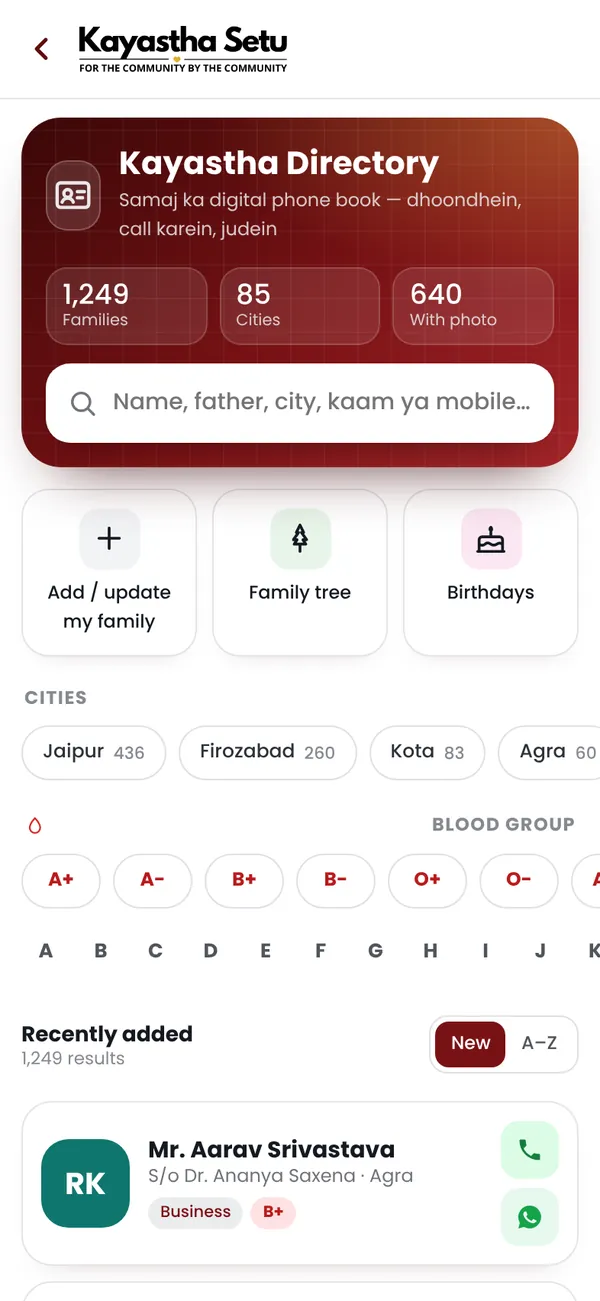
Frequently asked questions
How do I search the Family Directory?
Open Directory from the app home and type a name, city or profession. Tap a card to see the full profile, then call, WhatsApp or save the contact.
Is the Family Directory free?
Free members can see 3 full directory contacts per day. Full access is part of Premium at ₹149 per month, GST included.
Are the people in the directory real?
Every member signs up with a mobile OTP, profile changes are reviewed before they go live, and fake or duplicate accounts are caught by photo matching.