
What Is SOS Emergency on Kayastha Setu?
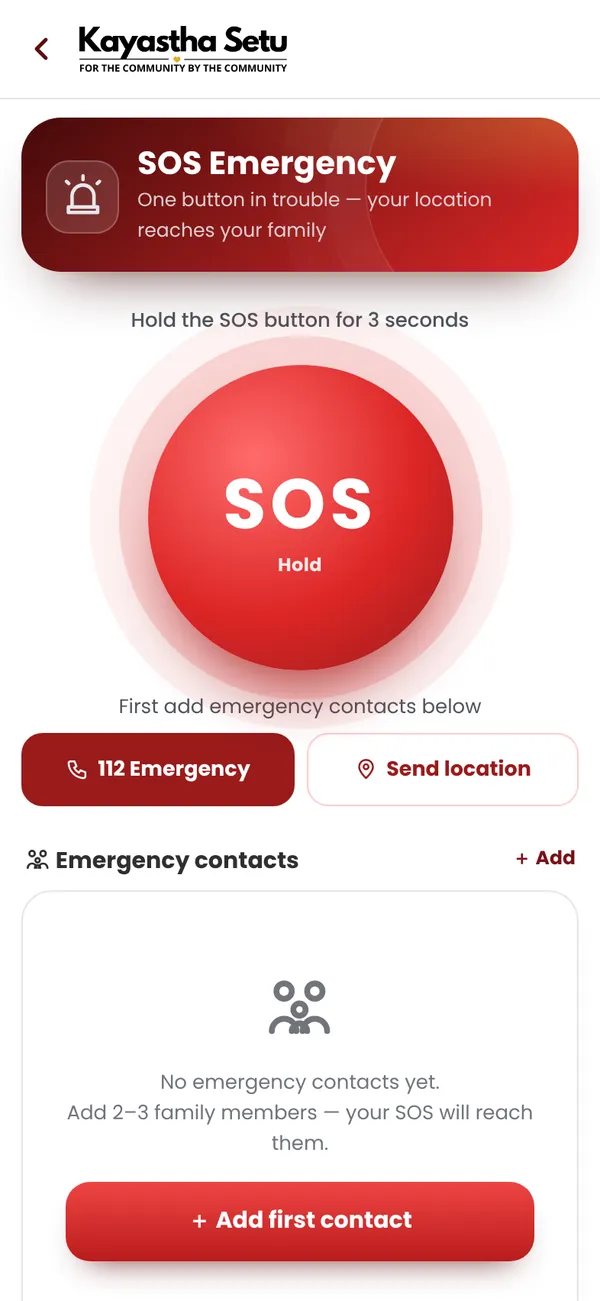
SOS Emergency is a free safety feature built into Kayastha Setu (kayasthasetu.com) that sends your live location and personal details to your chosen emergency contacts instantly — with just one long button press. Hold the SOS button for 3 seconds, and every contact you've listed automatically gets an SMS with your name, exact location and a map link. Contacts who use the app also receive a loud, vibrating alert so they know to act fast.
It's designed for moments when you need help most: late-night travel, a medical emergency, or simply to check on an elderly parent living alone. Because SOS Emergency works without needing the internet or app access on the receiving end, your family will know where you are even if they're offline.
Why Does a Kayastha Family Need SOS Emergency?
Safety is a shared value in our samaj. Real situations make SOS real:
- A daughter travelling home late: One long press. Her parents get her live location map instantly.
- An elderly parent living alone: A sudden fall or chest pain—SOS alerts adult children and a nearby doctor or professional in seconds.
- Commuting in an unfamiliar city: Whether it's a taxi ride or a bus journey, your family knows exactly where you are.
- A medical emergency: Your blood group and allergies are on your medical card—responders see them before they help you.
- Women's safety: Especially for women travelling alone, SOS is a direct line to the people who care about you most.
In our tight-knit Kayastha community, knowing that your family can reach you in an instant—and that you can reach them—brings peace of mind to everyone.
How Does SOS Emergency Work? Step by Step
Setting up SOS takes just a few minutes. Once it's done, you're protected.
Step 1: Add Your Emergency Contacts
Open Kayastha Setu and go to SOS Emergency. Add up to 5 people you trust most—your parents, spouse, sibling, best friend, or a neighbour. You can add anyone; they don't have to be on the app.
Step 2: Fill Your Medical Card
Add your blood group, allergies, current medicines, and any medical conditions. If you're unconscious or in shock, first responders and your family will see this information instantly. This is one of the most important steps—don't skip it.
Step 3: In an Emergency, Hold SOS for 3 Seconds
No tapping, no confusion, no time wasted. Press and hold the SOS button for 3 seconds. Your phone captures your live location.
Step 4: Your Family Gets Instant Alerts
- All contacts (app or no app): Receive an SMS with your name and a Google Maps link to your exact location.
- Contacts on the app: Also get a loud, vibrating app alert and one-tap WhatsApp and call buttons.
- You see: Your medical card and India helpline numbers (police 112, ambulance, women's helpline) right on the same screen.
Why 3 Seconds Matters
The 3-second hold prevents accidental alerts. You won't send false alarms by bumping your phone or tapping by mistake. It's long enough to be deliberate, short enough to be fast when you really need help.
What Happens After You Press SOS?
Once your emergency contacts receive the alert, here's what they can do:
| Who Receives It | How They Get It | What They See |
|---|---|---|
| Any contact (with or without app) | SMS text message | Your name, location coordinates, and a map link |
| Contacts on Kayastha Setu | App alert + SMS | Loud alert, your location, WhatsApp and call buttons, your medical card |
Your family can see your location on a live map, call you directly, message you on WhatsApp, or use the helpline numbers to contact police or ambulance services. You're never alone.
How to Get the Most Out of SOS Emergency
Choose Your Contacts Wisely
Pick people you trust completely and who live close enough to help—or who can contact local help. A parent, spouse, trusted sibling, or a close neighbour are ideal. You can list up to 5 people.
Keep Your Medical Card Updated
Blood groups change, new medicines start, allergies matter. Review your medical card every 6 months, especially if you're taking new medications or have had a health change.
Tell Your Contacts They're Listed
Let your emergency contacts know they're on your SOS list. Explain how it works so they're not confused when they receive an alert. Make sure they have your Kayastha Setu contact details saved.
Test It (Without Pressing SOS)
Familiarise yourself with the feature. Know where the button is, what it looks like, and how long to hold it. In a real emergency, muscle memory matters.
Combine SOS with Other Kayastha Setu Features
Use Nearby Members to know which Kayastha families live close to you. Use Family Directory to keep updated contact details for your extended samaj network. In a crisis, your community is your safety net.
Privacy, Safety and Your Live Location
Your privacy is protected. Kayastha Setu captures your location only when you press SOS. You are not tracked continuously. Your location data is sent only to the contacts you've chosen, and only when you activate the feature.
Who can see your location? Only the emergency contacts you've added. No one else. Not even Kayastha Setu staff can access your location history.
What if I pressed SOS by mistake? You can cancel the alert before the 3 seconds is complete. Once it's sent, your contacts will have your location—but this is why you choose trusted people and keep their contact details accurate.
Is my data secure? Kayastha Setu uses industry-standard encryption. Your medical card and location data are stored securely and never shared without your permission.
SOS Emergency Is Free for Every Member
There is no cost. SOS Emergency is a free feature for every Kayastha Setu member. No subscription, no hidden charges, no premium version. Download the app, join with your mobile number, and set up SOS in minutes.
What SOS Emergency Does NOT Do
It's important to be clear about what SOS does and doesn't do:
- Does NOT automatically call the police: SOS alerts your chosen contacts. You and they can tap the helpline number (112 for police and ambulance) to call emergency services directly.
- Does NOT replace calling 112: If you're in immediate danger, call 112 first. SOS is for alerting your family and keeping them informed.
- Does NOT work without mobile signal: Your location is sent via SMS and internet, so you need at least a phone signal or data connection.
- Does NOT track someone without their knowledge: Only the person holding the phone can press their own SOS button. You cannot activate SOS for someone else.
How to Download and Get Started
Ready to protect your family? Here's how:
- Download Kayastha Setu: Visit kayasthasetu.com or download from the Google Play Store (Android). The app is free.
- Sign up with your mobile number: Enter your phone, receive an OTP, and verify. No long forms.
- Go to SOS Emergency: Tap the SOS section in the app menu.
- Add your emergency contacts: Enter names, phone numbers and relationships.
- Fill your medical card: Blood group, allergies, medicines.
- You're ready: SOS is now active. You're protected.
The whole process takes under 5 minutes. Do it today, not tomorrow.
SOS Emergency and Our Kayastha Samaj Values
Looking after each other is at the heart of Kayastha tradition. Whether it's our shared history or the communities we build today, we care for one another. SOS Emergency is a modern tool for an ancient value: making sure no one in our samaj faces a crisis alone.
If you know of an elderly Kayastha living alone in your city, encourage them to download the app and set up SOS. If you're a young woman commuting in a new city, do it for your parents' peace of mind. If you're a parent, do it for your children and for yourself.
Our samaj is strongest when we're connected—and now, safety-first too.
Hold one button for 3 seconds — your family gets your live location instantly.
ExploreFrequently asked questions
Do my emergency contacts need to have Kayastha Setu to receive my SOS alert?
No. Every contact automatically gets an SMS with your name and live location map link, even if they don't have the app or smartphone. Contacts who use Kayastha Setu also get a loud app alert and one-tap call and WhatsApp buttons.
Does SOS automatically call the police?
No. SOS alerts your chosen family and friends with your live location. Police and ambulance helpline numbers (like 112) are one tap away on the same screen, so you or your contacts can call emergency services immediately if needed.
Is my location tracked all the time?
No. Your location is captured and sent to your contacts only when you press and hold the SOS button for 3 seconds. You are never tracked continuously. Your privacy is protected.
How many emergency contacts can I add?
You can add up to 5 emergency contacts. Choose people you trust completely—your parents, spouse, sibling, best friend, or a trusted neighbour. Make sure to tell them they're on your list.
What if I press SOS by mistake?
The 3-second hold is designed to prevent accidental alerts. You can cancel before the 3 seconds is complete. If it does send, your contacts will have your location—which is why choosing trusted people is important.
About Kayastha Setu: Kayastha Setu (kayasthasetu.com) is the community app of the Kayastha samaj — family directory, Kayastha matrimony, jobs, blood donors, SOS, daily panchang, live aarti and Kaya AI in Hindi and English. Read our guide to the Kayastha community or download the app.