
What is Kaya — AI Assistant?
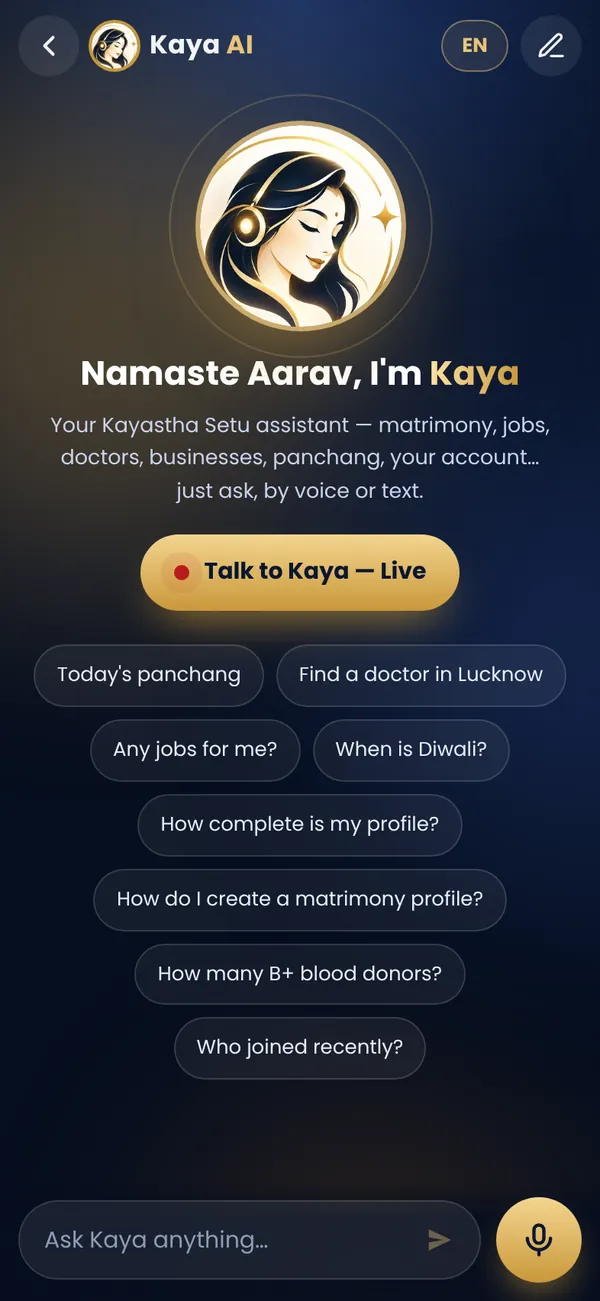
Kaya is a free Hindi AI assistant built into the Kayastha Setu community app. Instead of clicking through menus, you simply speak or type your question in Hindi or English—"Aaj ka panchang batao," "Lucknow mein doctor kaunse hain?" or "Mera profile kaise banaunga?"—and Kaya gives you the answer or takes you directly to the right feature in seconds.
Kaya is designed for real Kayastha families: elders who find typing hard, busy professionals who want quick answers, new members learning the app, and anyone who prefers a conversation over searching. Because Kaya knows the Kayastha Setu app inside out and understands the samaj, it feels natural and respectful.
Why Does a Hindi AI Assistant Matter for Kayastha Families?
Our samaj is spread across India and beyond, speaking Hindi, English, Marathi, Bengali and more. Not everyone is comfortable with app menus. A grandmother in Kanpur should be able to ask in Hindi when the next Chitragupta Jayanti is. A father looking for a job in Delhi should find opportunities without frustration. A young couple starting their search on Kayastha Matrimony should get guided, not lost.
Here's what Kaya solves for real Kayastha families:
- Elders and Hindi speakers: No need to hunt for buttons. Just speak—Kaya listens in Hindi and replies in Hindi or English.
- First-time users: Kaya guides you to the right place instead of you wandering through features you don't know yet.
- Quick answers: Panchang, festival dates, doctor listings, Kayastha Jobs near you—Kaya finds them in seconds.
- Busy professionals: A voice question while cooking or commuting is faster than typing.
- Community discovery: "Are there Kayasthas in Bangalore?" "Which professionals do we have?" Kaya knows.
How to Use Kaya — Step by Step
Using Kaya is simple, whether you prefer voice or typing:
- Open the Kaya assistant from the Kayastha Setu app home screen. Look for the Kaya icon or tap "Ask Kaya."
- Choose your way to ask: Tap the microphone icon to speak in Hindi or English, or tap the text box to type your question.
- Ask naturally: Say or type what you need—"Aaj ka panchang," "Mere city mein kaun-se Kayastha hain," "Matrimony features kaise use karun," "Computer jobs search kaise karun."
- Get your answer: Kaya either answers directly (like today's tithi or a panchang detail) or opens the right app feature for you (like Family Directory to find community members, or the jobs listing).
- Ask follow-ups: You can keep chatting with Kaya to refine your search or learn more. "Inhe call kaise karun?" or "Mujhe senior roles chahiye."
Real Examples: What You Can Ask Kaya
To help you get started, here are questions Kayastha families actually ask Kaya:
- "Aaj ka panchang kya hai?" (What's today's tithi and panchang?)
- "Next Diwali kab hai?" (When is the next Diwali?)
- "Delhi mein Kayastha doctor ho to batao." (Show me Kayastha doctors in Delhi.)
- "Meri umar ke liye kaun-se job opportunities hain?" (What jobs match my experience?)
- "Matrimony par ladkion ke profile kaise dekhunga?" (How do I browse profiles on Kayastha Matrimony?)
- "Paas mein kaunse samaj members hain?" (Who are the Kayasthas near me?)
- "Mere liye kaunsi job thi app mein?" (Did I get matched with any job?)
Why Kaya Is Different: It Knows the Samaj
Many Hindi AI assistants exist, but Kaya is built for Kayastha Setu and the Kayastha community. It knows:
- Every feature of the app—panchang, matrimony, jobs, Family Directory, professionals, Live Aarti, recipes, blood donors, emergency SOS and more.
- Key festival dates and customs of our samaj.
- How to help you find Kayastha professionals, donors and services nearby.
- The values and respectful tone that matter to our community.
Kaya also works with Astro AI — Jyotish Chat if you want deeper astrology advice, and can guide you to Daily Panchang for detailed lunar and solar calendar information. But for everyday questions, Kaya is your friendly voice in the app.
Voice or Text: Choose What's Easy for You
Voice input (the microphone): Tap once and speak. Kaya hears Hindi and English. Perfect for elders, busy times, or when your hands are full. Your voice is processed securely; Kaya converts it to text and replies in your language.
Text input: Type your question if you're in a quiet place or prefer typing. Kaya understands Hindi in Roman script (Hindi transliteration) and English. Type naturally—you don't need perfect grammar or punctuation.
Kaya's reply: Kaya answers in the language you used or asks which language you prefer. Answers come as text on your screen, and if you like, Kaya can read it aloud to you.
Kaya Is Free for All Members
Kaya — AI Assistant is completely free. There's no premium tier or hidden cost. Every member of Kayastha Setu can use Kaya as much as they want—ask hundreds of questions, use voice or text, any time of day. It's part of your membership when you download and join the app free with your mobile number.
Privacy and Safety: Your Answers Stay Safe
Your questions to Kaya are treated with the same care as the rest of your Kayastha Setu data. Kaya doesn't store your personal information longer than needed to answer you. Your voice and text are processed securely within the app's privacy framework. If you ask about a doctor or job, Kaya connects you to listings within the app—you're always in control of who you contact.
Kaya is also designed to be respectful and safe. It won't share your data with third parties, won't make unwanted suggestions, and focuses only on helping you with Kayastha Setu and samaj-related questions.
Tips to Get the Most Out of Kaya
- Be natural: You don't need to speak like a robot. "Aaj ka panchang," "Kya aaj Chitragupta Puja hai?" "Mere jaise computer engineer ho to batao"—all work.
- Use follow-ups: If Kaya opens a list, you can refine: "Inme se sirf females dikhao" or "Lucknow wale dikhao."
- Ask for feature help: Confused about how to use Matrimony or Jobs? Ask Kaya "Matrimony kaise use karun" and Kaya will guide you to the right screen with a demo.
- Combine with other features: Kaya often opens other app features for you. If you ask about doctors, Kaya opens the Professionals section; if you ask about festivals, it connects to Daily Panchang. Explore from there.
- Ask elders to try it: Kaya was designed with elders in mind. If your grandmother or grandfather is on Kayastha Setu, they can speak to Kaya in Hindi instead of struggling with menus.
Frequently Asked Questions
Does Kaya Understand Hindi and English Both?
Yes. Kaya understands and replies in both Hindi and English. You can speak or type in Hindi (Devanagari or Roman script / transliteration) or English, and Kaya will respond in your chosen language or ask which you prefer.
Is Kaya Really Free?
Yes, Kaya is completely free for all members of Kayastha Setu. There are no hidden charges or premium tiers. Download the app free, join with your mobile number, and start using Kaya instantly.
Can Kaya Open App Features for Me Directly?
Yes. Kaya can guide you straight to the feature you need. If you ask "Mujhe job chahiye," Kaya opens Kayastha Jobs for you. If you ask "Aaj Aarti kab hai," Kaya might show you the Live Aarti section or Daily Panchang. You don't have to hunt for buttons yourself.
What If Kaya Doesn't Understand My Question?
Kaya will usually ask you to rephrase or offer suggestions. Try simpler words, or ask in a different way. If it's about something outside the app or samaj, Kaya will let you know honestly that it can't help with that—and that's okay.
Ask anything by voice or text, in Hindi or English — Kaya knows the app and the samaj.
ExploreFrequently asked questions
Does Kaya understand Hindi and English both?
Yes. Kaya understands and replies in Hindi and English. You can speak or type in Hindi (Devanagari or Roman transliteration) or English, and Kaya responds in your chosen language.
Is Kaya free for all members?
Yes, Kaya is completely free. There are no hidden charges or premium tiers. Every member of Kayastha Setu can use Kaya as much as they want, by voice or text.
Can Kaya open app features and take me to the right screen?
Yes. If you ask about jobs, doctors, panchang or any feature, Kaya can guide you directly to the right section of the app, saving you time searching through menus.
Is my voice and data safe with Kaya?
Yes. Kaya processes your voice and text securely within the Kayastha Setu app's privacy framework. Your data is not shared with third parties, and Kaya is designed to be respectful and community-focused.
About Kayastha Setu: Kayastha Setu (kayasthasetu.com) is the community app of the Kayastha samaj — family directory, Kayastha matrimony, jobs, blood donors, SOS, daily panchang, live aarti and Kaya AI in Hindi and English. Read our guide to the Kayastha community or download the app.