
What Is Nearby Members — and Why It Matters for Kayastha Families
Kayastha Setu's Nearby Members feature is a privacy-first community map that shows you how many Kayastha families live near you — within 5, 10, 25 or even 50 kilometers. Instead of wondering whether there are other Kayasthas in your neighborhood or new city, you can now see a live heat-map of the samaj, find nearby members, and send them a friendly Namaste to start a conversation.
For a Kayastha family that has just moved to a new city, transferred for work, or sent a child to study abroad, finding Kayastha near me is not just convenient — it builds belonging. Whether you want to know your local samaj, find a trusted mentor, look for a PG for your son or daughter, or simply connect over shared culture and values, Nearby Members opens that door.
Real-Life Situations Where Nearby Members Helps
Moving to a New City
Imagine your family has just relocated to Bangalore, Mumbai, Delhi or any metro for a job transfer. You know no one. Within the Kayastha Setu app, you open Nearby Members and discover there are 47 Kayastha families within 10 km of your new address. That knowledge alone — that you are not alone — is comforting. You can reach out, attend samaj events together, and build a genuine local support network.
Students and Young Professionals Away from Home
A Kayastha student in Pune or a software engineer in Hyderabad often misses home and wants to connect with people who share their values and background. Nearby Members lets them find other young Kayasthas in their city, attend Samaj ki Sabhayein (community gatherings), find a Room, Flat & PG through trusted community members, or simply grab chai with someone who understands their culture.
Planning Local Samaj Events and Meet-ups
Kayastha samaj groups in a city can use Nearby Members to gauge how many families are in their area and organize cultural events, puja gatherings, or social welfare activities. Instead of guessing, they have real data and the ability to connect directly.
Emergency and Safety
In times of personal crisis — illness, accident, relocation help or other emergencies — knowing which Kayastha families are nearby can be invaluable. The app also has an SOS Emergency feature to reach out quickly when you need help.
How Nearby Members Works: Step by Step
Getting started is simple and takes about 30 seconds:
- Open Nearby from the Kayastha Setu app menu — Look for the Nearby Members tile on your dashboard or tap the map icon in the main navigation.
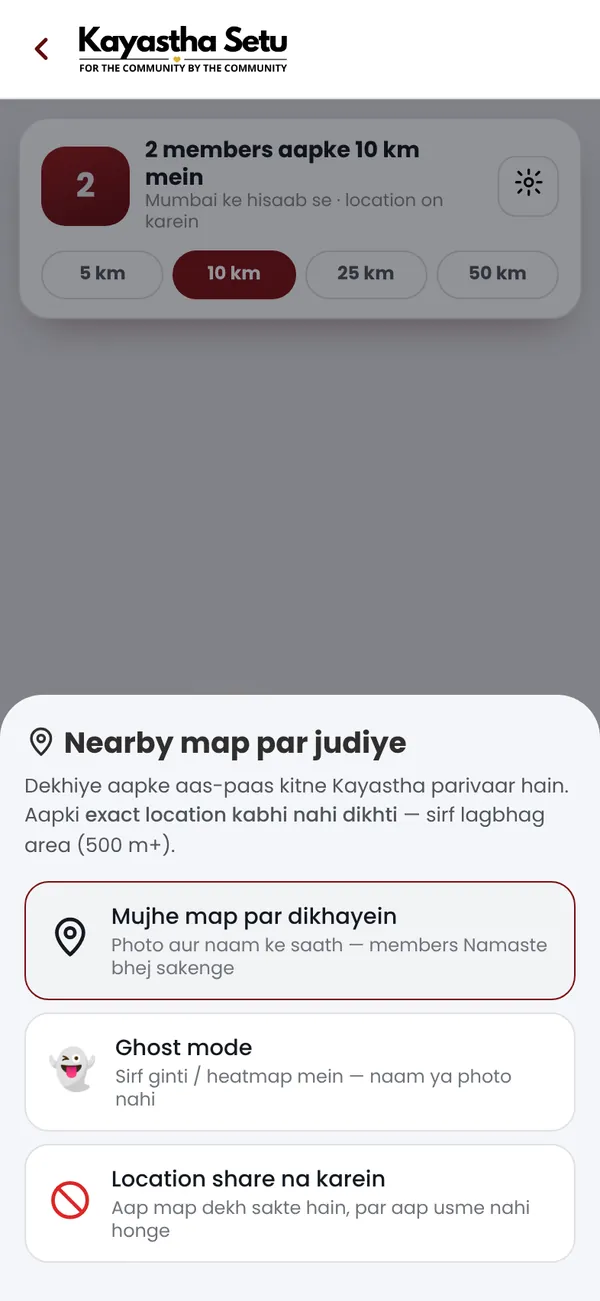
- Choose your privacy preference:
- Show Me — Your profile photo and name appear on the community map so others can find you and say Namaste.
- Ghost Mode — You are counted in the numbers (e.g., "3 members within 5 km") but do not appear visibly on the map.
- Off — You do not share your location at all and are not counted.
- Explore the live heat-map — See the concentration of Kayastha families in your city, district and neighborhood as a color-coded heat-map.
- Check member counts — At a glance, see how many members live within 5 km, 10 km, 25 km and 50 km of your location.
- Send a Namaste 👋 — Tap on a nearby member's card or name and send them a friendly greeting. If they accept, you can start a private conversation and exchange contact details.
- Connect and grow your network — Meet new families, attend samaj events, or find help and support within your local community.
The entire process is lightweight and works smoothly even on slow mobile data. Your location is checked only when you open the Nearby screen, so there is no constant battery drain.
Privacy First: How Your Data Is Protected
One of the biggest concerns when using a location-based feature is privacy. Kayastha Setu takes this seriously:
- Exact addresses are never stored — The app uses only an approximate, blurred area. No one can see your house, street, or exact coordinates.
- You are always in control — You can switch between Show Me, Ghost Mode, and Off anytime. Change your mind? Turn it off instantly.
- No tracking — Your location is not logged continuously. It is checked only when you open the Nearby screen.
- Safe connections — When you send a Namaste, the other member does not receive your address — just your name, profession, and an invitation to chat through the app.
- Ghost Mode option — If you want to know how many Kayasthas are around you but do not want to appear on the map, Ghost Mode lets you stay private while still being part of the data.
This privacy-first approach means you can use Nearby Members with confidence, especially in conservative families or professional settings.
Tips to Get the Most Out of Nearby Members
Tip 1: Use It When You First Join
The moment you sign up for Kayastha Setu, turn on Nearby Members (in Show Me mode if you are comfortable). This is your quickest way to discover the samaj in your city and start building connections.
Tip 2: Combine It with Family Directory and Samaj Events
Once you find nearby members, use the Family Directory to learn more about them — their profession, interests, and sub-community. Then attend Samaj ki Sabhayein (community gatherings) where you can meet them in person in a comfortable, organized setting.
Tip 3: Personalize Your Profile
Add a clear photo, write a warm bio, mention your profession and interests. When someone sees your Namaste, they are more likely to respond if your profile feels genuine and approachable.
Tip 4: Use Ghost Mode for Discovery Without Commitment
If you are new to the app or unsure about revealing your location, start in Ghost Mode. You will still see the community heat-map and member counts, and you can decide later whether to go public.
Tip 5: Say Namaste Thoughtfully
When you send a Namaste, include a one-line message: "Hi, I just moved to Pune and am new to the Kayastha community here!" or "Looking to connect with young professionals in our samaj." A personal note makes a big difference.
Tip 6: Respect Others' Privacy Choices
Some members may be in Ghost Mode or Off — that is their choice. Do not be discouraged. Focus on those who are openly visible and reciprocating.
Is Nearby Members Free? What About Premium?
Nearby Members is free for every member of Kayastha Setu. You do not need to pay anything to see the community heat-map, check member counts, or send a Namaste. This is part of Kayastha Setu's commitment to building a connected samaj without barriers.
Once you connect with someone and start a conversation, all messaging and community features remain free as well.
Getting Started Today
If you are looking for Kayastha near me or want to build your local Kayastha network, Nearby Members is your gateway. It is designed for real-life situations: job transfers, new cities, student life, loneliness in a big city, or simply wanting to strengthen your ties with the samaj.
Download Kayastha Setu today (it is free, works on Android and the web), sign up with your mobile number, and open Nearby Members to see your community around you. You can download the app here or visit kayasthasetu.com from your browser.
Remember: the samaj is stronger when we know each other. Nearby Members makes that connection possible.
See how many Kayastha families live near you — on a live community map.
ExploreFrequently asked questions
Can other members see my exact home address or location?
No. Exact locations are never stored or displayed in Nearby Members. The map uses only an approximate, blurred area — no one can see your house, street, or GPS coordinates. Your privacy is protected by design.
I do not want to appear on the map. Can I still use Nearby Members?
Yes. Choose Ghost Mode and you will be counted in the member numbers (e.g., "3 members within 10 km") but will not appear visibly on the map. You can see the heat-map and explore nearby members, but remain private. You can switch to Show Me anytime.
Does Nearby Members drain my phone's battery?
No. Your location is checked only when you open the Nearby Members screen, not continuously in the background. The feature is also lightweight and works smoothly on slow internet connections.
What happens after I send a Namaste to someone?
They receive a notification with your name, profile photo, and your message. If they accept, you can start a private chat within the app and exchange contact details. If they do not respond, no further messages are sent — respect their choice.
About Kayastha Setu: Kayastha Setu (kayasthasetu.com) is the community app of the Kayastha samaj — family directory, Kayastha matrimony, jobs, blood donors, SOS, daily panchang, live aarti and Kaya AI in Hindi and English. Read our guide to the Kayastha community or download the app.