
Not everyone enjoys tapping through menus to find what they need. Some of us would rather just ask, the way we ask a family member: “Beta, aaj ka panchang batao.” That is exactly why we built Kaya, the AI assistant inside the Kayastha Setu app. In this article we explain what Kaya does, how to use it, and how it helps members reach the right service in seconds.
What is Kaya?
Kaya is the voice and text AI assistant you see on the Kayastha Setu home screen. You can talk to Kaya or type your question — whichever is easier for you. Kaya understands Hindi and English, speaks with a natural voice, and knows every feature of the app. Most importantly, Kaya can open the right section of the app for you, so you do not have to search for it.
Kaya is free for all members. You can read more on the Kaya AI Assistant page.
Why “just ask” is faster
Kayastha Setu has many sections — Panchang, Family Directory, Jobs, Doctors, Blood Donors, Matrimony, Marketplace and more. For a regular user that is wonderful. For a first-time user, or a grandparent, it can feel like a lot. Kaya removes that confusion. You say what you need in your own words, and Kaya gives you a clear answer or takes you straight to the right screen.
How to use Kaya in four simple steps
- Open Kaya from the app home screen.
- Tap the mic and speak, or type your question.
- Get your answer, or the right screen opens for you.
- Ask a follow-up if you want to know more.
That is all. No need to remember where each feature is kept.
Things you can ask Kaya
Here are some everyday examples of how members use Kaya.
Panchang and festivals
“Aaj ka panchang batao.” “Agla tyohar kab hai?” Kaya can tell you about today’s tithi or the next festival. For full details like nakshatra, Rahu Kaal and sunrise for your location, it can take you to the Daily Panchang.
Doctors and professionals
“Lucknow mein doctor.” Kaya helps you find people and services, and can guide you to Doctor, Vakil & Professionals, where you can search by profession and city, see member recommendations, and call or WhatsApp in one tap.
Jobs
“Mere liye koi job hai?” Kaya can guide you to Kayastha Jobs, where you can search by role, city and experience and apply in one tap with your saved job profile.
Blood donors
In an urgent situation, you may not want to look through menus. Ask Kaya about blood donors and it can help you reach Blood Donors, where you choose the blood group and city or post an urgent request.
Matrimony help
Parents often ask how to make a profile for their son or daughter. Kaya can help with matrimony questions and guide you to Kayastha Matrimony.
How to use any feature
“Family tree kaise banaye?” “SOS kaise set karein?” Because Kaya knows the whole app, it can explain how a feature works and open it for you.
| You say | Kaya helps with |
|---|---|
| “Aaj ka panchang batao” | Today’s tithi and the Panchang screen |
| “Lucknow mein doctor” | Finding doctors and professionals |
| “Mere liye koi job hai?” | Kayastha Jobs |
| “Agla tyohar kab hai?” | Upcoming festivals |
| “Family tree kaise banaye?” | How to use the feature |
A special help for elders
We had our parents and grandparents in mind when we built Kaya. Many elders are comfortable speaking but find small buttons and menus tiring. With Kaya, they can simply tap the mic and speak in Hindi. The answer comes in seconds, in a natural voice.
If you are setting up the app for your parents, show them just one thing first: the Kaya button. Everything else they can simply ask for.
The whole app also works in Hindi, English, Marathi and Bengali, so elders can choose the language they are most comfortable reading.
Safe and respectful
Kaya is built for the community. Its answers are respectful and private, so the whole family can use it with confidence. Kaya is there to guide you — the actual details, like a doctor’s profile or a job listing, come from the sections of the app where members and the team keep them.
Tips to get the best out of Kaya
- Be specific: add your city when you ask about doctors or jobs.
- Speak naturally: you do not need special words. Talk the way you talk at home.
- Ask follow-ups: if the first answer is not enough, simply ask again.
- Use it to learn the app: ask Kaya to explain any feature you have not tried yet.
Kaya and the rest of the app
Kaya is the friendly front door. Behind it are the features that do the real work — the Family Directory, Panchang, Jobs, Blood Donors and more. If you have questions about your own kundli, there is also Astro AI, a separate jyotish chat that is part of Premium.
Next time you open Kayastha Setu, tap the Kaya button on the home screen and ask your first question. Whether you are a young professional in a new city or a grandparent who just wants today’s tithi, Kaya is there to help you find what you need, faster. Happy exploring!
Ask anything by voice or text, in Hindi or English — Kaya knows the app and the samaj.
Explore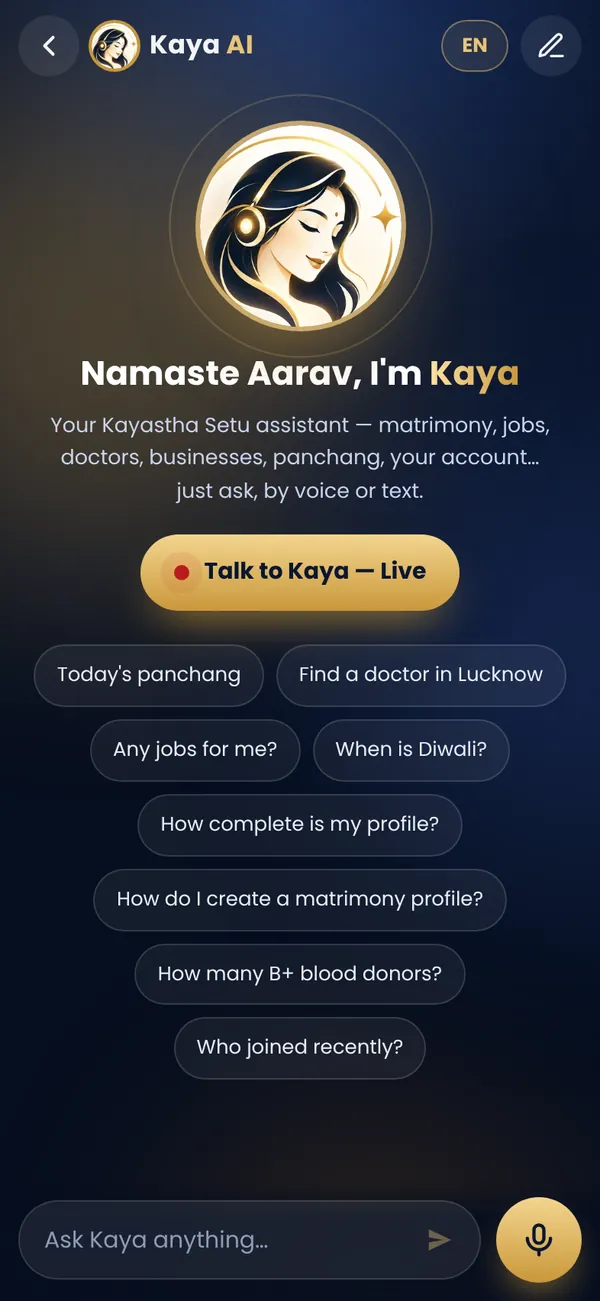
Frequently asked questions
What languages does Kaya understand?
Kaya understands Hindi and English, by voice or by text.
Can Kaya open features for me?
Yes. Kaya knows every feature of the app and can open the right section for you.
Is Kaya free to use?
Yes, Kaya is free for all Kayastha Setu members.