
Many families now hear the words "AI" and "artificial intelligence" every day, on the news and at the dinner table. Some feel excited, some feel a little unsure. On the Kayastha Setu app there are two AI helpers, and each one has a very different job. In this article we explain both in simple words, so that you know which one to open, when to use it, and where its limits are.
Two assistants, two different jobs
Think of them like two helpful people in a large joint family. One knows the whole house and can tell you where everything is kept. The other is someone you sit with quietly when you have a personal question about life.
- Kaya is the general assistant. It sits on the home screen and helps you use the app and find information.
- Astro AI is a jyotish chat. It answers personal questions using Vedic jyotish principles and your own birth chart.
| Kaya | Astro AI | |
|---|---|---|
| Main purpose | Answers questions and opens the right part of the app | Guidance on career, marriage, business, family or your day |
| How you ask | Voice or text, in Hindi or English | Chat style, with follow-up questions |
| What it needs from you | Just your question | Birth date, time and place, entered once |
| Plan | Free | Part of Premium |
Kaya: your guide inside the app
Not everyone enjoys searching through menus. With Kaya you simply tap the mic or type, and ask the way you would ask a family member. "Aaj ka panchang batao." "Agla tyohar kab hai?" "Lucknow mein doctor." Kaya gives a clear answer or takes you straight to the right screen in a few seconds.
Kaya knows every feature of Kayastha Setu, so it is a good companion for first-time users and for elders. If Dadi wants to check today's tithi, she does not need to find the Daily Panchang section herself. She can just ask Kaya. If a young person wants to look at jobs, Kaya can open Kayastha Jobs for them.
Good ways to use Kaya
- Ask about today's tithi or the next festival.
- Ask it to find doctors, jobs, blood donors and other services.
- Ask "How do I use this feature?" when something feels new.
- Ask a follow-up question if the first answer is not quite what you wanted.
Astro AI: a thoughtful jyotish conversation
Everyone has a question that sits in the heart: a job change, a child's shaadi, a new business, a parent's health, or simply how the day will go. Astro AI lets you ask such questions in your own words.
You enter your date, time and place of birth once. Your chart is prepared, and every answer is read against it, based on Vedic jyotish principles. You can ask follow-up questions like a normal conversation, and the answers come in simple Hinglish that is easy to understand. Astro AI is part of Kayastha Setu Premium.
Please remember: Astro AI answers are guidance for reflection, based on Vedic jyotish. They are not a guarantee of what will happen. For important decisions, like marriage, money or health, always sit with your family and speak to qualified people such as doctors, financial advisers or a trusted pandit ji.
Privacy-minded tips for both assistants
AI is helpful, but good habits keep you and your family comfortable. Here are some simple tips.
- Share only what is needed. Kaya needs only your question. Astro AI needs your birth details. There is no need to type bank details, passwords, OTPs or your Setu PIN into any chat. Nobody genuine will ever ask you for these.
- Your birth details stay private. In Astro AI, your birth details and questions stay private. Still, ask about yourself, and ask about others only with their permission.
- Keep your own phone safe. Your Kayastha Setu account works on one device at a time and is protected by your mobile OTP and 4-digit Setu PIN. Do not share your PIN, even with friendly helpers.
- Use the right tool. For finding a doctor or a donor, Kaya can guide you. For a real emergency, use the SOS button, which sends your live location to your emergency contacts.
Understanding the limits of AI
AI is a tool, like a calculator or a map. It is quick and patient, but it is not a person and it does not know your family the way you do. A few things to keep in mind:
- AI can make mistakes. If an answer looks wrong, check it again or ask in a different way.
- AI does not replace experts. Kaya can help you find a doctor or an advocate, but the advice itself should come from that qualified person.
- AI does not replace family. The best decisions in our samaj have always been made together, with elders, parents and children talking openly.
- Jyotish is guidance. Astro AI always encourages practical action. Effort, honesty and patience still matter most.
Which one should I open?
Here is a simple rule. If your question is about the app, information or services, open Kaya. If your question is about your own life path, seen through jyotish, open Astro AI. And if you are not sure where something is, just ask Kaya first. It knows the whole house.
Technology with sanskar
Our samaj has always been a samaj of the pen and of learning. Using new tools wisely is part of that same tradition. When the young help the elders learn Kaya, and elders remind the young that no machine replaces family wisdom, technology truly serves the samaj.
So go ahead, open the app, say "Namaste Kaya", and see how much easier everyday things become. And whenever a big question comes up, let Astro AI help you reflect, then talk it over with the people you love. With warm wishes from the Kayastha Setu Team.
Ask anything by voice or text, in Hindi or English — Kaya knows the app and the samaj.
Explore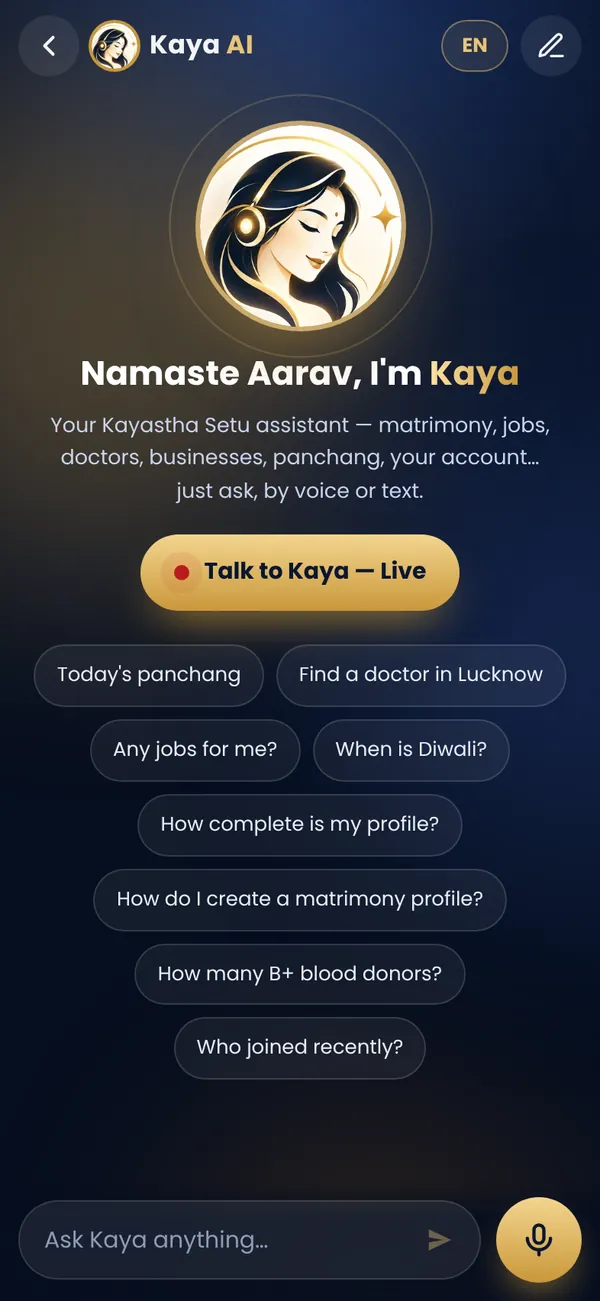
Frequently asked questions
What is the difference between Kaya and Astro AI?
Kaya is the free app assistant that answers questions and opens the right section by voice or text. Astro AI is a Premium jyotish chat that answers personal questions using Vedic jyotish and your birth chart.
Are Astro AI answers a guarantee?
No. Astro AI answers are guidance for reflection based on Vedic jyotish. For important decisions, talk with your family and qualified people.
Can elders use Kaya easily?
Yes. Kaya understands voice and text in Hindi and English, so elders can simply speak their question instead of searching menus.