
When someone in the family needs blood, or when an elder feels unwell while alone at home, the first few minutes matter the most. In those moments we usually start calling relatives one by one. Kayastha Setu has two free features that make this easier: Blood Donors and SOS Emergency. This guide explains how to use both, calmly and correctly.
Part 1: Blood Donors – Help from Our Own Samaj
The Blood Donors section shows community members who have chosen to donate blood. You can search by blood group and city, and donors in your city appear first.
What the Blood Donors section offers
- All blood groups – compatible groups are shown automatically, so you do not have to remember the chart.
- City first – donors near the hospital appear on top.
- Urgent requests – matching donors in that city get a push notification right away.
- Call or WhatsApp – reach a donor in one tap.
- Last donation date – donors mark when they last donated, so nobody is called too soon.
How to find a donor
- Open Blood Donors in the app.
- Choose the blood group and city.
- Call or WhatsApp a donor, or post an urgent request.
- When help arrives, mark the request closed.
Posting an urgent request
If you do not find a donor quickly, post an urgent request. Add the hospital name and the number of units needed. Matching donors in that city get a notification immediately. Please keep the details accurate, and close the request once the need is met, so donors are not disturbed unnecessarily.
Becoming a donor yourself
Becoming a donor needs only one switch. If you are healthy and willing, turn it on. One donation from you can bring great relief to a worried family. Remember to update your last donation date after every donation.
If you organise blood camps or similar seva, you can also add it in the Volunteers & Seva section. Approved volunteers get a badge on their profile and free Premium.
Part 2: SOS Emergency – The Button You Hope You Never Need
SOS is made for late-night travel, an elderly parent living alone, or a sudden medical emergency. It works in a very simple way.
How SOS works
Hold the SOS button for 3 seconds. Your live location is captured, and up to 5 emergency contacts automatically get an SMS with your name, coordinates and a Google Maps link. This SMS reaches them even if they do not have the app or internet. Contacts who use the app also get a loud, vibrating alert, with WhatsApp and call buttons one tap away.
The 3-second hold prevents accidental alerts, and there is no need to type anything in panic.
Set up SOS today, not tomorrow
- Add up to 5 emergency contacts – a spouse, children, a neighbour or a close relative.
- Fill your medical card with blood group, allergies and medicines.
- Show elders in the family how to hold the button for 3 seconds.
- Check the India helpline numbers inside the app – police, ambulance, women and child helplines.
The medical card is very useful for responders. If you have elderly parents, sit with them for ten minutes and fill it together.
Using Both Features Together
Here is a simple example. An elderly member feels unwell at night. They hold SOS, and their children receive the SMS with the location. The family reaches the hospital, and the doctors say blood may be needed. The family opens Blood Donors, selects the blood group and city, and posts an urgent request with the hospital details. Matching donors nearby get notified.
| Situation | Feature to use |
|---|---|
| You feel unsafe or unwell and need family to reach you | SOS Emergency |
| A patient needs a specific blood group | Blood Donors – search or urgent request |
| Responders need your blood group and allergies | Medical card in SOS |
| You need police or ambulance numbers | Helplines in SOS |
Some Gentle Reminders
Kayastha Setu helps the community connect, but it does not give medical advice. Doctors and blood banks decide all medical matters, including whether a donor is suitable. If anyone is in danger, please also call 112 straight away.
- Do not share someone’s health details on the open timeline without permission.
- Thank the donor and close the request once help arrives.
- Respect the gap between donations. Never pressure anyone to donate.
- Keep your emergency contacts updated when phone numbers change.
Why This Matters for the Samaj
Our community has always come forward in times of need. These two features simply make that help faster and better organised. A blood donor in the same city, a son who gets his mother’s location in seconds – these are small things that can make a big difference.
Please take five minutes today: switch on the donor option if you can, add your emergency contacts, and fill your medical card. We hope you never need it, but it is good to know the samaj is with you. Stay safe, and take care of each other.
“Ek boond, ek jeevan” — find matching blood donors in your city, fast.
Explore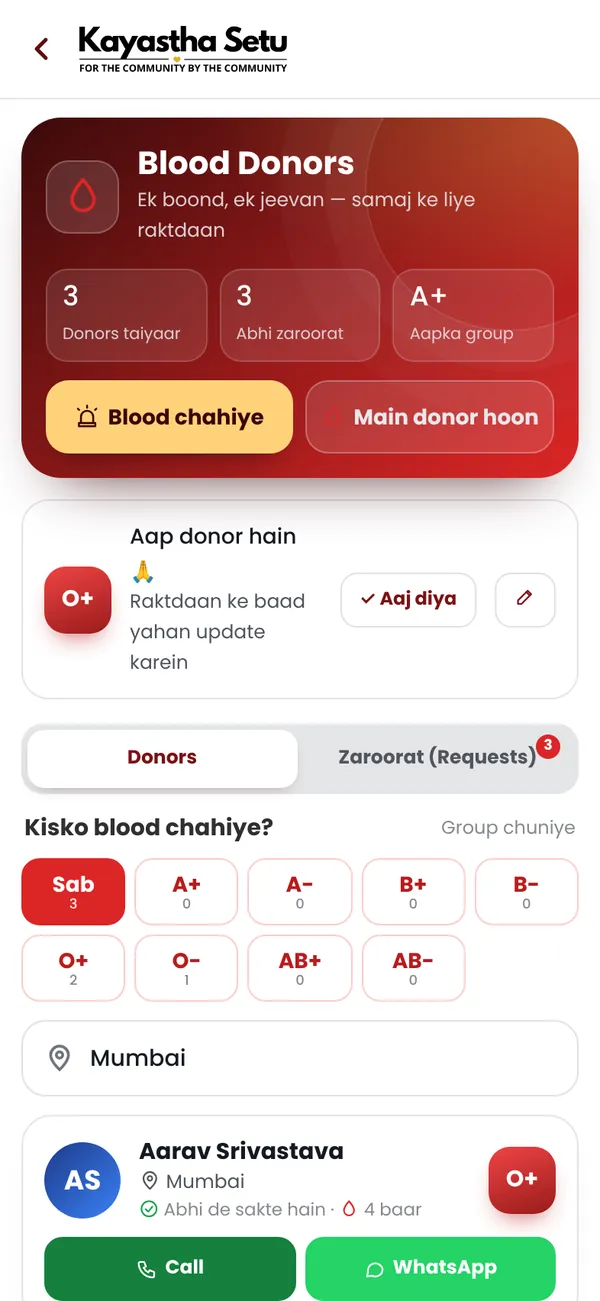
Frequently asked questions
How do I find a blood donor on Kayastha Setu?
Open Blood Donors, choose the blood group and city, then call or WhatsApp a donor or post an urgent request.
How does the SOS button work?
Hold SOS for 3 seconds and up to 5 emergency contacts get an SMS with your name and live location, even without the app or internet.
Does the app give medical advice?
No. Doctors and blood banks decide medical matters. If anyone is in danger, please also call 112.