
Almost every Kayastha sabha has organised a blood donation camp at some point. It might have been on Chitragupta Puja, on a founder's birth anniversary, or simply because a member's family once struggled to find blood in a hospital. These camps are some of the finest seva our samaj does. But anyone who has organised one knows the real work: finding volunteers, spreading the word, keeping a list of donors, and staying in touch after the camp is over.
This guide shows how a sabha or a group of members can use the features already in the Kayastha Setu app to plan a blood drive, and to keep the samaj ready for emergencies long after the camp day.
Why a camp should be more than one day
A camp collects blood for a blood bank, and that is wonderful. The bigger gift, though, is what remains afterwards: a group of members who know their blood group, who are willing to donate again, and who can be reached quickly when a family in the samaj needs help. Kayastha Setu helps with exactly this "after" part, because donors who opt in on the app stay findable by blood group and city.
Step 1: Bring the sabha and the volunteers together
Start with the people who will run the camp. Open Samaj ki Sabhayein to find your city or district sabha and its office bearers. You can call, WhatsApp or email the President, Secretary or Treasurer in one tap. If you are a young member with an idea for a camp, this is the easiest way to reach the right people instead of asking around for a phone number.
Next, form a small team. Members who already do seva can add their work in the Volunteers & Seva section from My Account. Blood camps are one of the kinds of seva listed there. Once the team reviews and approves a volunteer, that member gets a volunteer badge on their profile, free Premium, and a place on the samaj's wall of honour. It is a small way of saying thank you to the people who give their time.
Step 2: Announce the camp on the Community Timeline
The Community Timeline is where the samaj shares news, so it is a natural place to announce your camp. A good announcement post can include:
- Date, time and venue of the camp, written clearly.
- Which blood bank or hospital is partnering with your sabha.
- A contact person from the organising team.
- A simple request: "Please turn on Become a Donor in the Blood Donors section of the app."
Add a photo or poster, and use the share button to send the post to your family WhatsApp groups in one tap. Because only verified members can post on the timeline, the announcement reaches real families from the samaj.
Step 3: Build your donor list through the app
The heart of the drive is the Blood Donors section. Any member can become a donor by turning on one switch. Ask everyone who attends the camp, and everyone who reads your announcement, to do this. Here is why it helps:
- Donors appear by blood group, and compatible groups are shown automatically.
- Donors in the same city appear first, so local help is found fastest.
- Each donor can mark their last donation date, so nobody is called too soon after giving blood.
On camp day, a volunteer can sit at a help desk and gently help elders and first-time users turn on the donor switch and update their last donation date. This turns a one-day camp into a living donor list for your city.
Step 4: Prepare members for emergencies with SOS
A blood camp is also a good moment to talk about emergency readiness. The SOS Emergency feature lets a member hold the SOS button for 3 seconds, and up to 5 emergency contacts automatically get an SMS with their name and live location, even if those contacts do not have the app or internet. Contacts who use the app also get a loud alert.
At the help desk, volunteers can help members:
- Add up to 5 emergency contacts.
- Fill their medical card with blood group, allergies and medicines.
- See where India helpline numbers are kept in the app.
Elderly members who live alone, and students staying in other cities, benefit the most from this ten-minute setup.
Step 5: Follow up after the camp
The camp ends, but the work does not. A few simple follow-ups keep the spirit alive:
- Post a thank-you on the Community Timeline with photos, so donors feel appreciated and others feel inspired for next time.
- Remind donors to update their last donation date in the app.
- Encourage volunteers to add this camp to their seva timeline in the Volunteers section.
- Plan the next camp with your sabha office bearers, perhaps on the next big community occasion.
When an urgent need comes up
Because your donors have opted in on the app, a family facing an emergency can open Blood Donors, choose the blood group and city, and call or WhatsApp a donor directly. They can also post an urgent request with the hospital and units needed, and matching donors in that city get a push notification right away. Once help arrives, the request should be marked closed so donors are not disturbed.
A gentle note: the app helps you reach people quickly, but doctors and blood banks decide all medical matters, including who can donate and when. In any danger or emergency, please also call 112.
Blood camps have always shown the best of our samaj. With a little planning and the features already in Kayastha Setu, one camp can become a caring network that stays ready for every family. We wish your sabha a successful drive, and thank every donor and volunteer who makes it possible.
“Ek boond, ek jeevan” — find matching blood donors in your city, fast.
Explore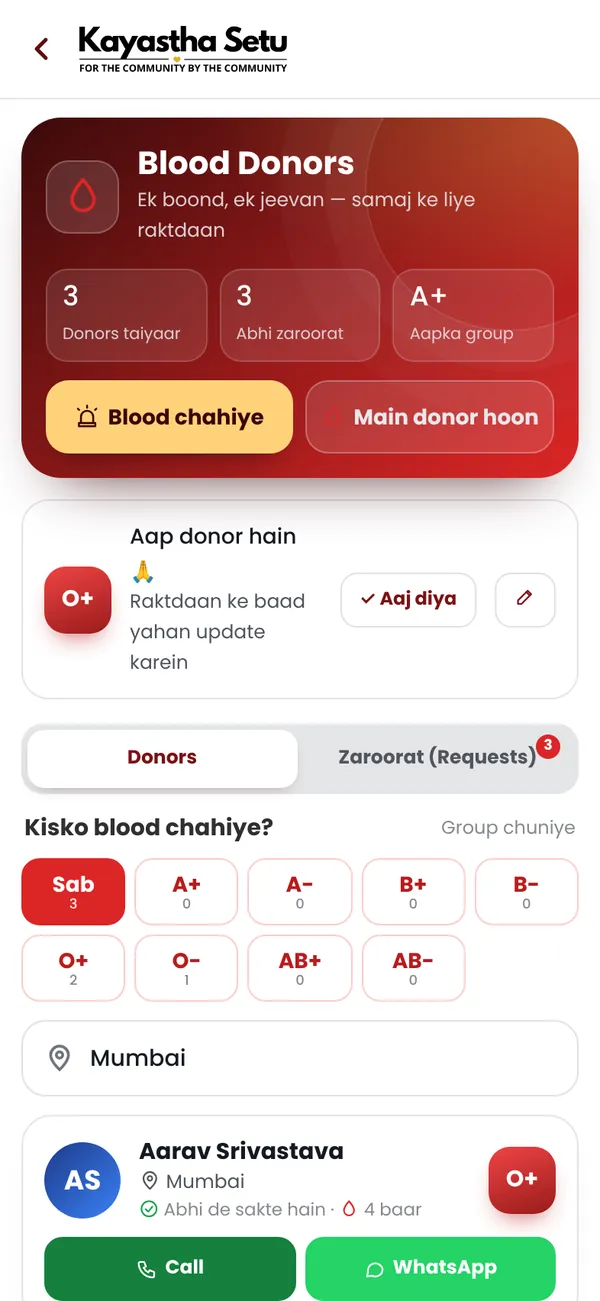
Frequently asked questions
Can our sabha use Kayastha Setu to organise a blood donation camp?
Yes. You can contact office bearers through Samaj ki Sabhayein, announce the camp on the Community Timeline, and ask attendees to turn on Become a Donor in the Blood Donors section.
How do donors avoid being called too soon after donating?
Each donor can mark their last donation date in the app, so others can see it and respect the gap between donations.
Do volunteers who help at camps get anything?
Members can add their seva in the Volunteers section. Once approved, they get a volunteer badge, free Premium and a place on the wall of honour.