
Ask any family elder about their grandparents and you will hear wonderful stories. Ask them about their great-grandparents and the names often become uncertain. In just one generation, names, places and dates can be lost if nobody writes them down. The Family Tree on Kayastha Setu helps you build your vansh vriksh on your phone, with photos and dates, and keep it alive together with your family.
This is a practical, step-by-step guide. Keep your phone in hand, call a parent or grandparent to sit beside you, and let us begin.
Before you start: collect what you know
A little preparation makes the work smooth. Spend ten minutes gathering:
- Full names of parents, grandparents and, if known, great-grandparents.
- Birth years or dates of birth, even approximate ones.
- The city or native place of each person.
- Occupation, for example teacher, advocate, farmer, government service.
- Old photographs. A clear photo taken on your phone of an old print works well.
Do not worry if some details are missing. A tree grows branch by branch. You can always add more later.
Step 1: Open the Family Tree
The Family Tree is free for every member. Open the Family Directory from the app home and go to Family Tree from there. If you cannot find it, you can simply ask Kaya, the app assistant, to open it for you.
Step 2: Start with yourself and your closest family
Begin with the people you know best. Add your:
- Father and mother
- Spouse
- Children
For each person, add a photo, date of birth or birth year, city and occupation. These small details turn a list of names into a real family story. When children open the tree later, they will see faces, not just words.
Step 3: Go one generation up
Now add your grandparents on both sides. This is the best moment to involve elders. Ask them:
- "Dadaji ka poora naam kya tha?"
- "Nanaji kis shahar mein rehte the?"
- "Unka kaam kya tha?"
Type in what they remember. If they know about their own parents, add great-grandparents too. Every name you save today is a name your grandchildren will not lose.
Step 4: Add in-laws and side branches
A Kayastha family is never small. Add in-laws, and the brothers and sisters of parents if you wish. Keep it simple at first. You do not need to finish the whole family in one sitting.
Step 5: Link relatives who are already members
This is the most useful part. If a relative already uses Kayastha Setu, you do not need to type their details again. Search for them and link them. Their tree joins yours, and the family grows together.
Linking also helps from the other side. In the Family Directory, a member's profile is linked to the Family Tree, so you can jump from a profile to the tree and see how you are related.
Tip: before linking, check the photo, father's name and city on the profile so that you connect the right person.
Step 6: Share the tree and build it together
No single person knows every branch. Your mama knows the maternal side best, your bua remembers stories of her in-laws, and a cousin in another city may have old photos. Share the tree with cousins and let them add the branches they know.
Your tree is private by design. It is visible only inside the app, never on the open web. So you can share it with family members on Kayastha Setu with peace of mind.
Step 7: Let the tree remind you of birthdays
Once dates are in the tree, birthdays from the tree can remind you to wish on time. With Birthdays, Wishes & Gifts, you can send a wish in one tap or choose a gift from the in-app catalogue. Small gestures keep the family close.
Good habits for an accurate tree
| Habit | Why it helps |
|---|---|
| Use full names | Avoids confusion between people with the same short name |
| Add a city for everyone | Helps future generations trace native places |
| Ask two elders when unsure | Memories differ; comparing gives better accuracy |
| Add photos slowly | Choose clear, respectful photos, one person at a time |
| Review once a year | Add new babies, marriages and updated details |
Make it a family activity
Building the tree is a lovely activity for a Sunday afternoon or a festival gathering. Children can hold the phone and type, elders can share names and stories, and parents can find photos. You can also read Kayastha Gyan together to learn about Bhagwan Shri Chitragupta ji and the 12 Kayastha vansh, and share family stories and lok geet in Recipes & Parampara.
Elders love seeing the tree on screen, and children finally understand who is who at every family function. "Yeh kaun hain?" becomes "Oh, these are Papa's cousin's children!"
Your vansh vriksh, safe for the next generation
Start small. Add your parents today, your grandparents this week, and invite one cousin to add their branch. In a few weeks you will have a tree that your whole family can be proud of. Happy tree building, from the Kayastha Setu Team.
Build your vansh vriksh — parents, grandparents, children and in-laws, with photos.
Explore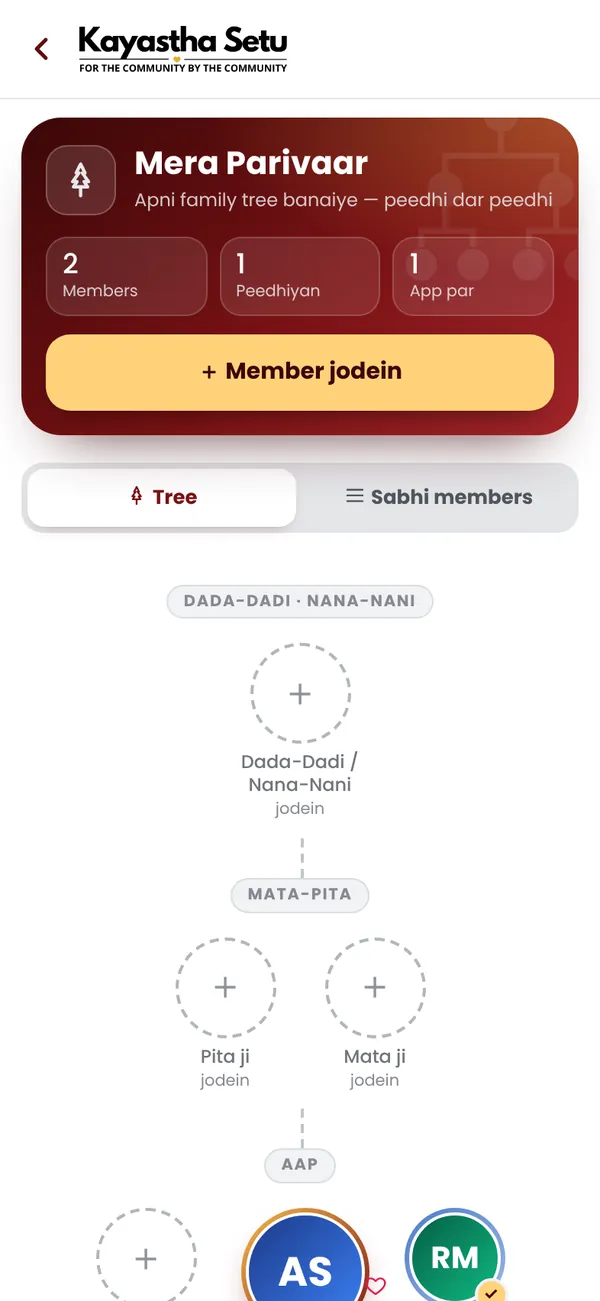
Frequently asked questions
Is the Family Tree free?
Yes. The Family Tree is free for every Kayastha Setu member.
Can I link relatives who already use the app?
Yes. Search for a relative who is already a member and link them, and their tree joins yours.
Who can see my family tree?
Your tree is visible only inside the app, never on the open web, and you can share it with family members.